


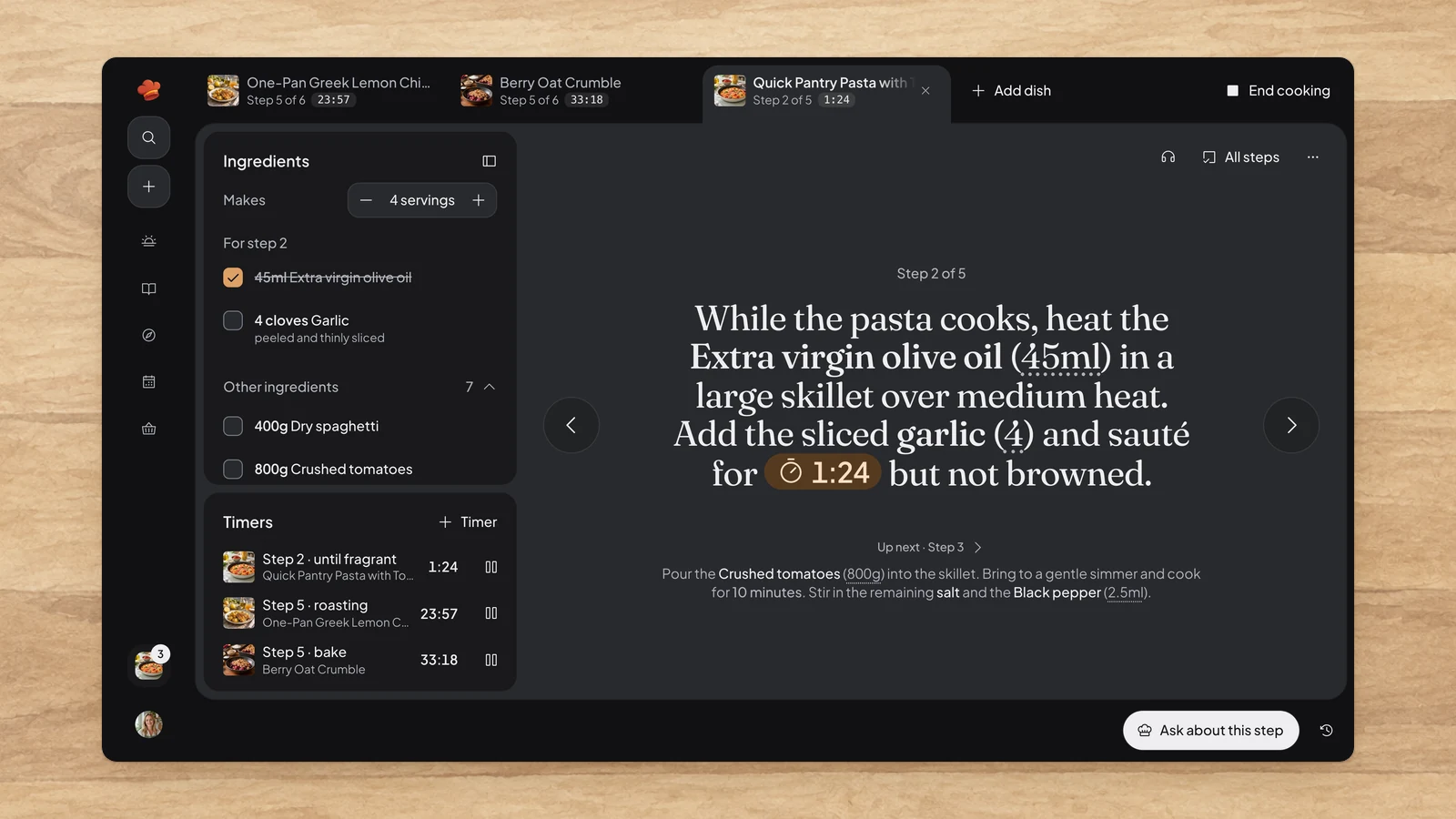
Rebuilt cooking mode
Cooking a whole meal now keeps every dish in view. Each dish you start gets its own tab with its step and next timer, so you can hop from the curry to the rice without losing your place.
Beside the step, the ingredients this step uses come first, so you can measure out what you need right now and tick it off. The rest of the recipe stays open below.
Every timer you start, from any dish, waits in one Timers panel. A timer that runs out keeps counting in red, so you can see how long the pan has been waiting, until you choose Done. Add your own timer for anything the recipe doesn't time, like the pasta water.
Stuck? Choose Ask about this step and Simmer already knows where you are, how many you're feeding and what's on the timer. Wander off to plan tomorrow and the sidebar keeps an eye on the stove.
Chats that stay open
Chats you open with Simmer now stay open as tabs next to Simmer at the bottom of the window. Keep a question about tonight's curry going while you ask about tomorrow's bread in another, and switch between them in one press. Older chats reopen from Past conversations.
Drag the Simmer panel wherever it suits you, or choose Dock to the side to keep it beside the page, or beside your step while you cook.
Improvements6
- You can now write to Simmer before you have an account, and your message goes through once you sign up or sign in.
- You can now polish a selection of recipes in your library, generate photos for the ones without one, or add them to your meal plan one per day.
- You can now import a Mr. Cook export in Import, with each recipe's photo and the video it was saved from as its source link.
- Added Use link to new recipes, to fill in a link you've just copied.
- Improved Polish, which now starts in one step with every improvement and keeps the individual ones under Customize.
- You can now rename your Family in Family settings when you own it.
Fixes1
- Fixed recipes Simmer creates missing some cheeses and noodles you can't eat from their allergen labels.