Skip to content

Changelog

New features, improvements, and fixes in Daily Simmer on the web, newest first.

  1. Save recipes from your browser

    Our extension for Chrome, Edge, and Firefox saves the recipe page you're on to your recipe library, without copying the link.

    Web
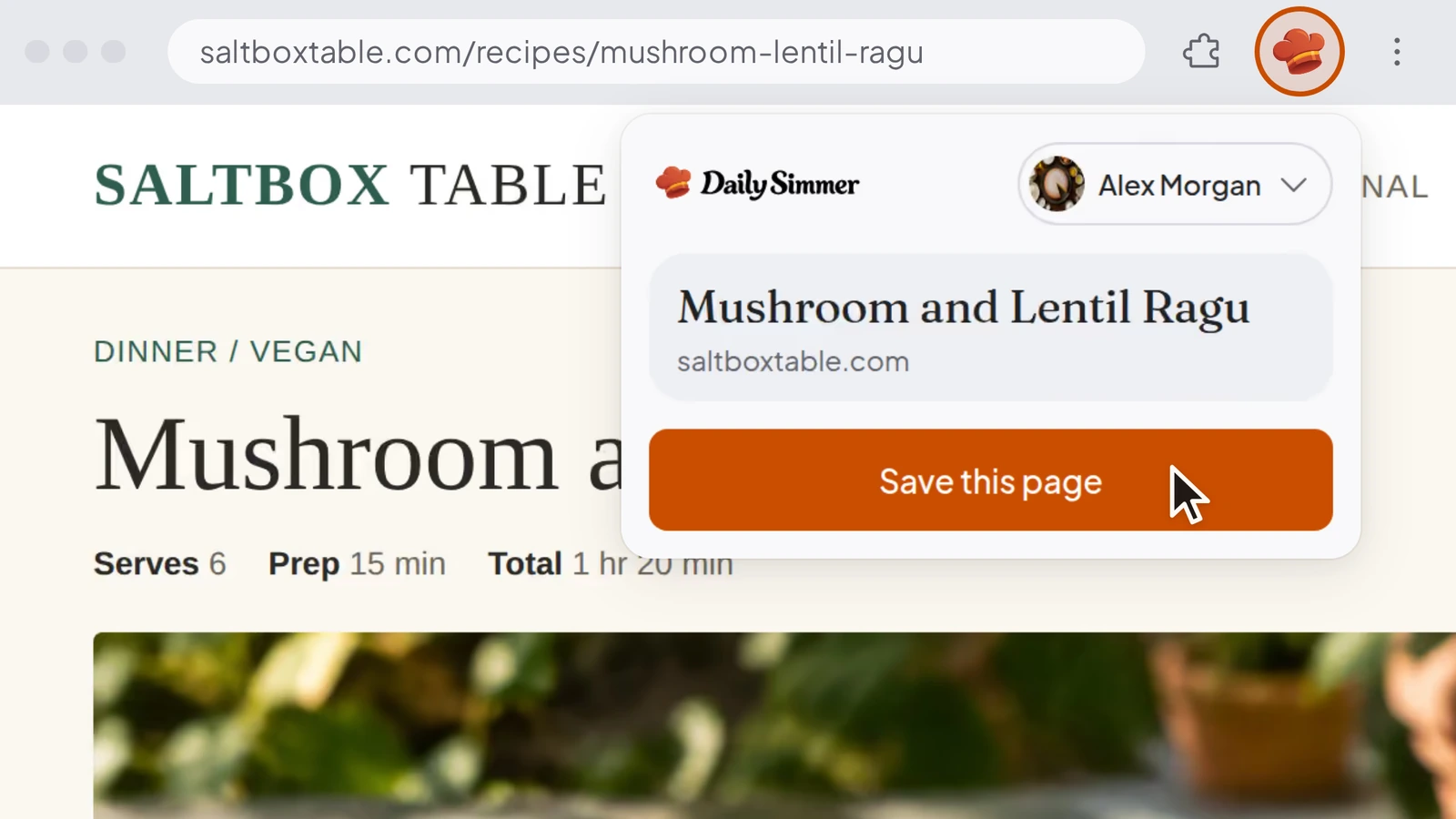
    The Daily Simmer extension popup open in a browser over the Mushroom and Lentil Ragu recipe page on saltboxtable.com, with the pointer on Save this page.

    Save recipes from your browser

    Until now, keeping a recipe from another site meant copying its link into Daily Simmer. Our extension for Chrome, Edge, and Firefox on a computer saves the page you're reading, or the recipe behind a link.

    Connect your account once, then choose Save this page from its toolbar button, or right-click and choose Save to Daily Simmer. The recipe comes in while you keep browsing. The popup says "Recipe ready" when it's in your library, and Open recipe takes you to it. Until you connect, each save opens Daily Simmer in a new tab and imports the recipe there.

    Bringing in a post or video counts toward your AI usage.

    Improvements15
    • You can now open Daily Simmer on the web without a connection, with the recipes, plans, lists and collections already on your device.
    • When you're offline, we show how many changes are waiting to save, and ask before you log out with changes that haven't saved.
    • You can now drag a recipe into the sidebar to pin it or add it to a pinned collection, or onto the cooking dock to start cooking it.
    • Right after you sign up on the web, you can now tell us who you cook for, how you eat and what to leave out, then add your first recipe.
    • Signing up with your email on the web now takes just the emailed code. One "About you" step then asks for your name and your username.
    • You can now delete your account as a Family owner by choosing who takes over the Family, or by disbanding it.
    • You can now remove any recipe from your Family's library, including one another member shared, and the cook who created it keeps it.
    • On a recipe shared with you, only its owner can now choose the cover or remove other people's photos, and you can still remove the ones you added.
    • When you share your profile, its link is now dailysimmer.com/@yourname, and older links to it still open it.
    • You can now try Plan my week on the planner before you sign up.
    • When your Family can see a recipe, adding its ingredients to your shopping list now starts on the Family's list.
    • You can now empty a shopping list from its menu with Clear all items, and undo it.
    • You can now start cooking a planned meal from its menu.
    • When a recipe has estimated amounts, one note under the ingredients now says so, and pointing at it highlights them.
    • When you cook in Fahrenheit, oven temperatures now read the way a US recipe prints them, so 200°C shows as 400°F.
    Fixes15
    • Fixed imports turning text from around the recipe on the page into ingredients or steps.
    • Fixed imports asking for an amount when an ingredient line already gives one in words.
    • Fixed some recipe pages failing to import on the first try.
    • Fixed photos on imported recipes going blank on Library cards after a while.
    • Fixed Continue with Google and Continue with Apple on the web leaving a new cook signed out instead of creating their account.
    • Fixed the meal planner showing a week as empty when you were offline and it hadn't loaded yet.
    • Fixed recipes we write for a meal idea using a food you avoid in more places than your note asked for.
    • Fixed some milks and milk powders not marking a recipe as containing dairy when you save it or change its ingredients.
    • Fixed Remixes and Simmer's edits that use dairy-free yogurts, creams or cheeses being marked as containing dairy.
    • Fixed Remixes and Simmer's edits that use a plant binder in place of eggs being marked as containing eggs.
    • Fixed recipes imported in Fahrenheit showing their oven temperature a degree off.
    • Fixed recipes in US units showing "¼ cups" and "4 cloves garlic cloves".
    • Fixed Simmer failing to adapt a saved recipe when the rewrite took longer than usual.
    • Fixed Simmer saying it couldn't change a saved recipe when you asked from that recipe's chat.
    • Fixed Plus showing the wrong plan, or still renewing after you cancel, when billing updates arrive late.
  2. Redesigned meal planner

    The web meal planner has a new layout, Plus cooks can add their meal plan to a calendar, and your food profile now shapes what Daily Simmer suggests.

    Web

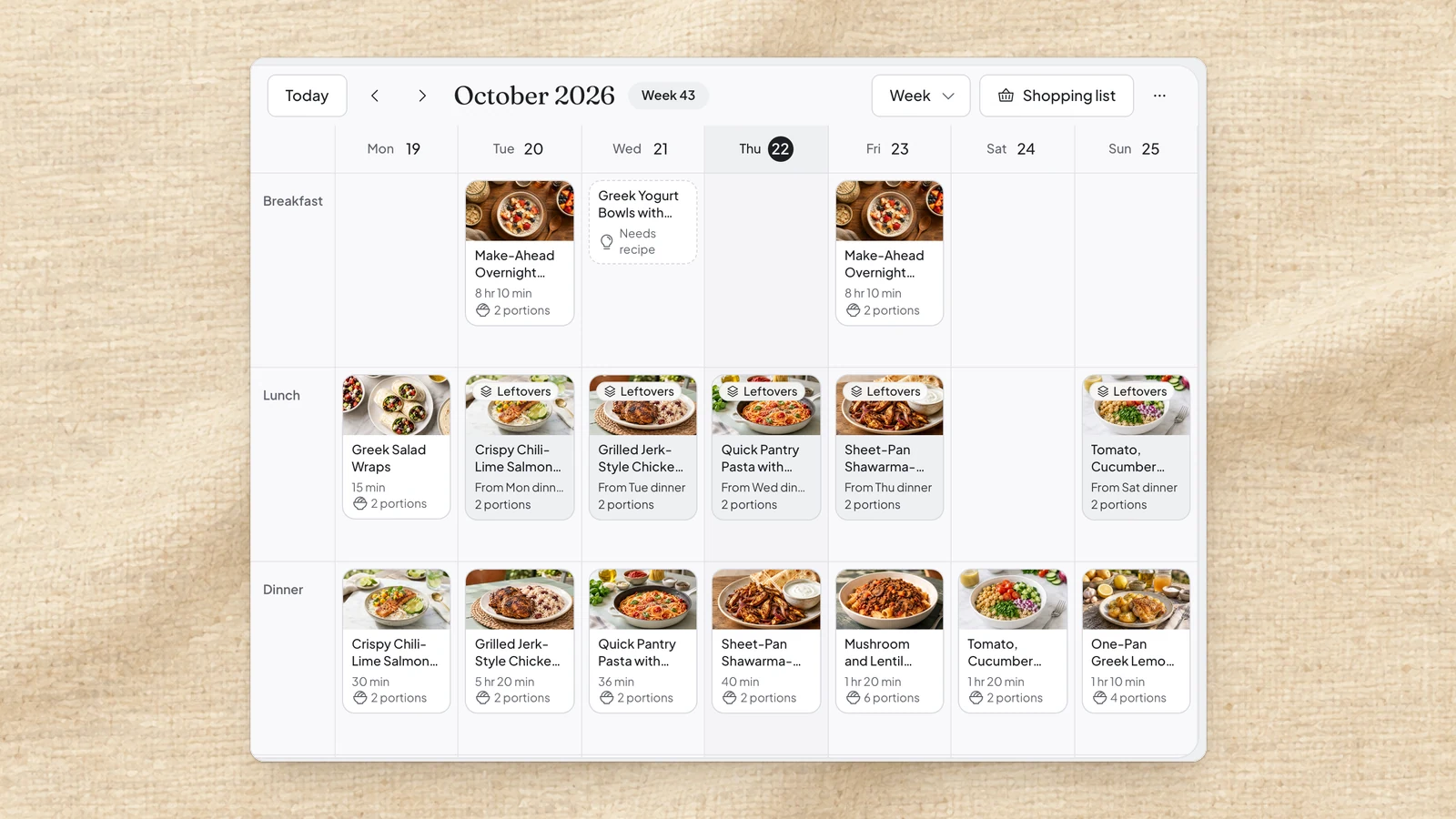
    The redesigned web meal planner showing a week of breakfasts, lunches and dinners as photo cards, with leftovers labelled and a meal idea that still needs a recipe.

    Redesigned meal planner

    The meal planner on web has a new layout. Meal cards now show a photo, cooking time and portions, and leftovers are labelled as leftovers, so you can tell at a glance what you cook each day and what you eat again.

    Any day in the week is quicker to fill, whether you pick one of your recipes, let Daily Simmer suggest one that fits, or jot down an idea and write the recipe later. You can change a meal right where it sits, the month view now shows each meal's photo, and a right-click gives you quick access to a meal's actions. The planner also keeps up as you move and change meals.

    The new planner is on web. When Daily Simmer suggests a meal or writes a recipe for a meal idea, that counts toward your AI usage. Writing recipes for several meal ideas at once needs Cookbook or Plus.

    Meal plan in your calendar

    With Plus, your meal plan can now show up in Google Calendar, Apple Calendar or Outlook, and it stays up to date as the plan changes.

    See tonight's dinner next to the rest of your day, at the meal times you choose or as an all-day event. If you cook with a Family, you can include the Family plan too.

    Calendar links need Plus and are set up on web. Your calendar app picks up changes the next time it refreshes.

    Turn it on with Add to calendar in the planner's menu.

    Suggestions that fit how you eat

    You now decide how Daily Simmer cooks for you. In your food profile, choose the ingredients you'd rather leave out, from common ones such as gluten or in your own words.

    The recipes and meal plans Daily Simmer suggests then leave those ingredients out, so a week it drafts for you already fits how you eat. If you ask for a dish that includes one, you still get it, with a warning that it conflicts with your food profile before you add it.

    Always check ingredients and labels yourself.

    Improvements10
    • Improved adding a week's meals to your shopping list, with grouping beside the list and a count of what you've selected
    • You can now open a shopping list item to see where its amount comes from, meal by meal and recipe by recipe
    • Added an offer to write the recipe for you when a search finds little or nothing; writing it counts toward your AI usage
    • You can now pin collections to the sidebar and drag a recipe onto one to add it
    • You can now add a recipe to several collections at once from its menu
    • You can now right-click recipes, collections, shopping list items and chats for quick access to their actions
    • Improved writing a recipe by hand, on a focused page where you add ingredients and steps one line at a time or paste them in as text
    • Improved recipe imports, which now try a deeper read when a page doesn't import the first time
    • You can now paste a list of recipe links with Cookbook or Plus and they import in the background, skipping recipes already in your library; links to social posts and videos count toward your AI usage
    • Added a note in the sidebar after you save your first recipe that says it's private, with a shortcut to who can see it
    Fixes9
    • Fixed undo after saving or eating leftovers not putting both meals back
    • Fixed planned recipe cards cutting off their portions in a busy week
    • Fixed meals jumping back for a moment when you move or change several in a row
    • Fixed meal ideas for cooks who avoid gluten not naming the gluten-free version of ingredients that come in one, including in Dutch
    • Fixed dishes described as only partly plant-based counting as vegan in planner and assistant diet checks
    • Fixed allergen labels and planner conflict checks missing a food that a recipe only partly replaces
    • Fixed dairy warnings misreading some plant-based milks, creams and butters
    • Fixed a new collection briefly showing twice in your recipe library
    • Fixed people you share a recipe with being able to export or change private notes they aren't allowed to see
  3. Simmering in the background

    Imports, Polish and translations now keep going in the background under Simmering, and something's brewing on the Today page for Halloween.

    Web

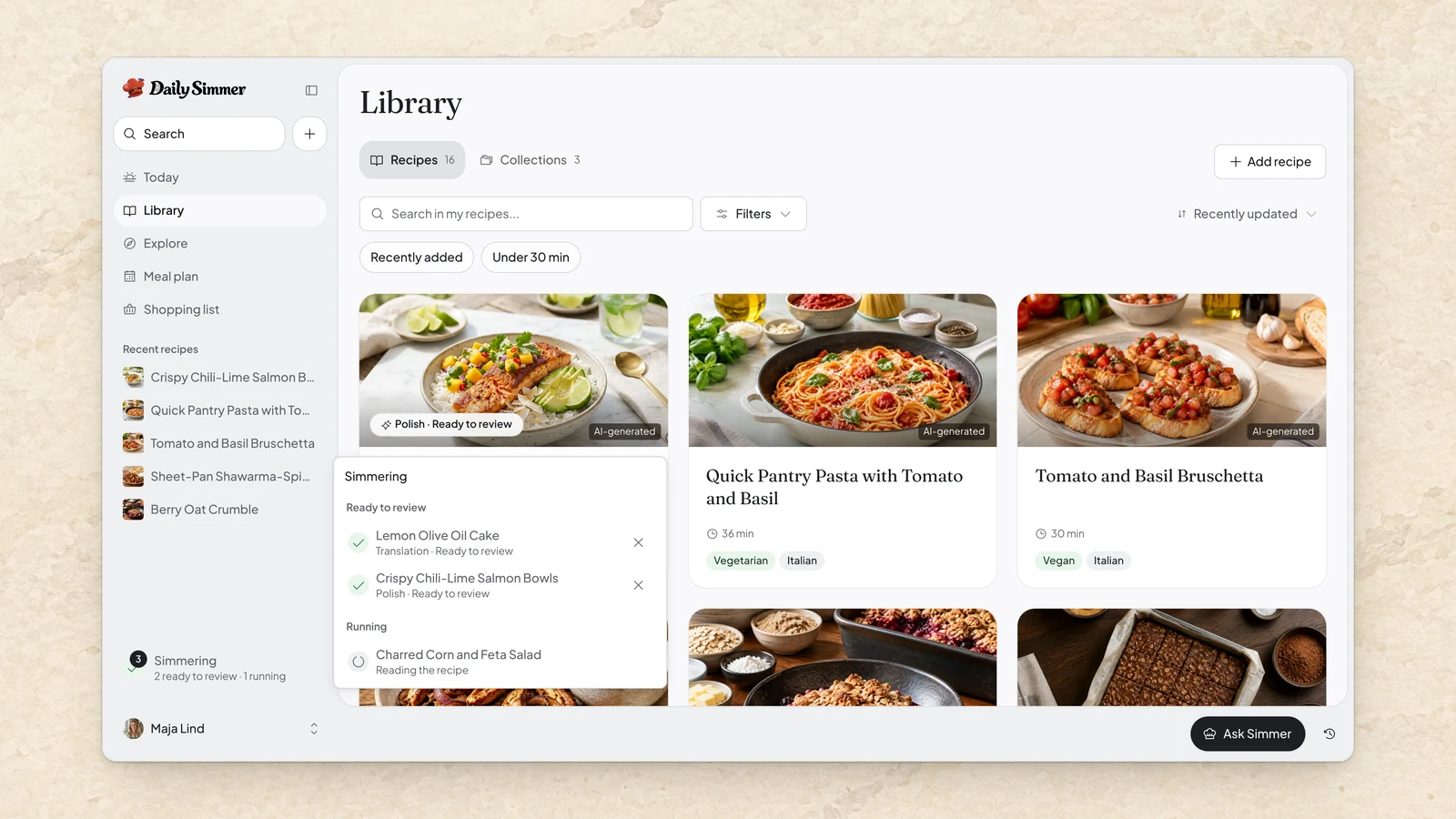
    The Library in Daily Simmer with the Simmering panel open from the sidebar, showing a Translation and a Polish ready to review and a recipe import still running.

    Simmering in the background

    Polish and translations now keep going while you get on with something else. Polish one recipe while you open the next, or leave an import running, and whatever you have going keeps simmering under Simmering until you're ready.

    Open it to see what's still cooking and what's ready, and pick each one up whenever suits you.

    Something's brewing for Halloween

    The Today page keeps the calendar where you are, and this month it has a few tricks planned. Our own Halloween recipes are creeping into your suggestions, lined up around the way you eat, and the rest of the app is slipping into costume. Whatever you do, don't hover over the chef's hat.

    Improvements9
    • You can now import a recipe from a link to a photo of it.
    • When a photo or video link won't import, we now show you how to copy the right one from the app you found it in.
    • You can now paste a photo of a recipe into the Today page or the new recipe window to create a recipe from it.
    • Added an "AI-generated" caption to recipe photos made with AI.
    • Added a "Created with AI" note to recipes Simmer wrote, as a reminder to check the ingredients, quantities and steps before cooking.
    • Added more recipes for the same occasion to "Related recipes" on public seasonal recipes.
    • You can now make a selection of recipes in your library public or private with Set visibility, and making them public asks you first.
    • You can now drag shopping list items into your own order, or into another aisle, and the list remembers where they go.
    • You can now merge an item that's on your shopping list twice when its amounts are in different units, such as cloves and grams, and choose which row stays.
    Fixes2
    • Fixed new, imported and edited recipes missing some ingredients you can't eat from their allergen labels, including ingredients named in other languages.
    • Fixed shopping list items keeping a recipe's preparation notes in their names.
  4. Rebuilt cooking mode

    Cooking mode now keeps every dish, this step's ingredients and all your timers in view, and your chats with Simmer stay open as tabs, in a panel you can float or dock.

    Web

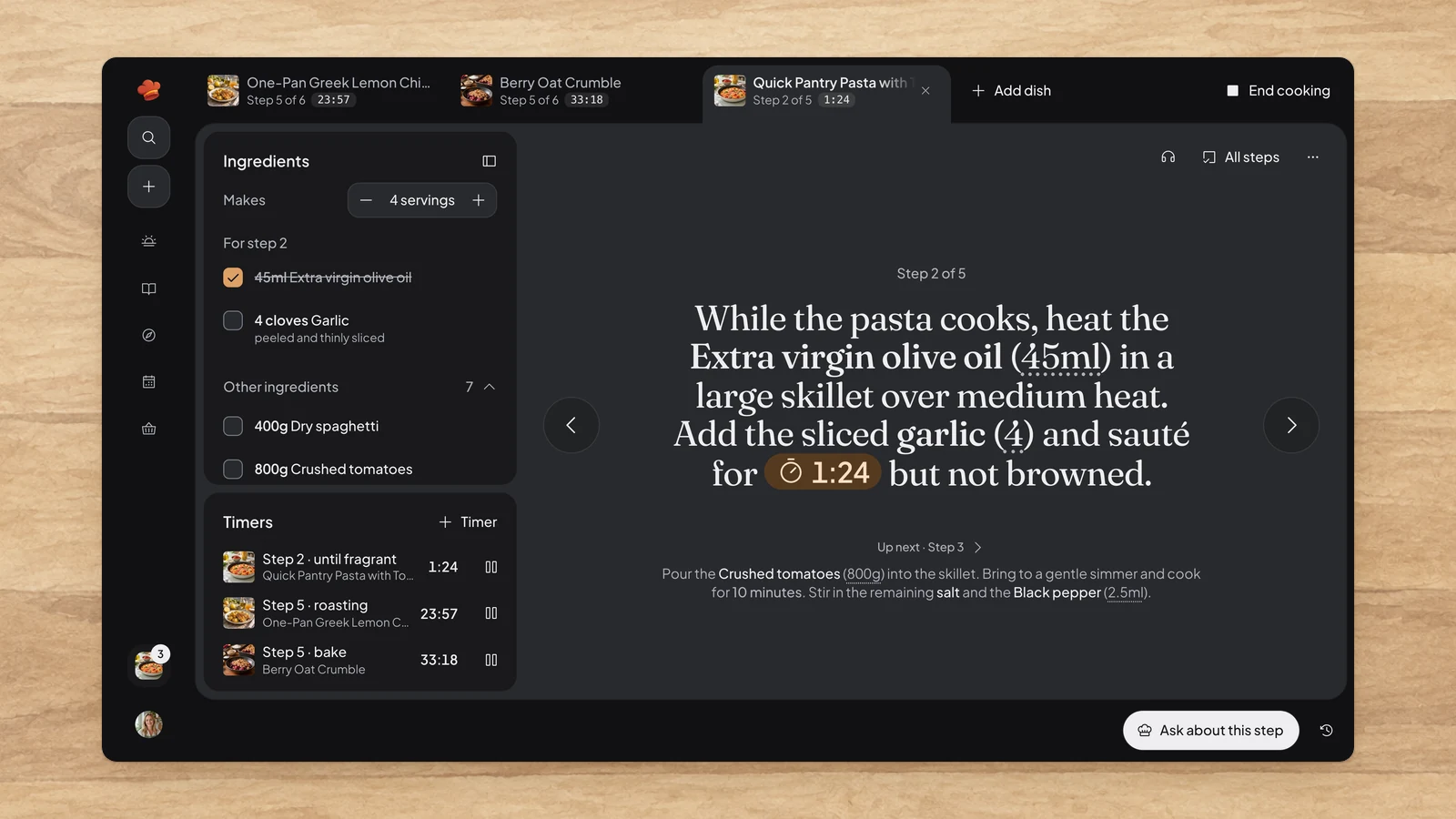
    Cooking mode in Daily Simmer with three dishes in tabs, the pasta step showing its running timer inside the sentence beside that step's ingredients and a Timers panel counting down all three dishes.

    Rebuilt cooking mode

    Cooking a whole meal now keeps every dish in view. Each dish you start gets its own tab with its step and next timer, so you can hop from the curry to the rice without losing your place.

    Beside the step, the ingredients this step uses come first, so you can measure out what you need right now and tick it off. The rest of the recipe stays open below.

    Every timer you start, from any dish, waits in one Timers panel. A timer that runs out keeps counting in red, so you can see how long the pan has been waiting, until you choose Done. Add your own timer for anything the recipe doesn't time, like the pasta water.

    Stuck? Choose Ask about this step and Simmer already knows where you are, how many you're feeding and what's on the timer. Wander off to plan tomorrow and the sidebar keeps an eye on the stove.

    Chats that stay open

    Chats you open with Simmer now stay open as tabs next to Simmer at the bottom of the window. Keep a question about tonight's curry going while you ask about tomorrow's bread in another, and switch between them in one press. Older chats reopen from Past conversations.

    Drag the Simmer panel wherever it suits you, or choose Dock to the side to keep it beside the page, or beside your step while you cook.

    Improvements6
    • You can now write to Simmer before you have an account, and your message goes through once you sign up or sign in.
    • You can now polish a selection of recipes in your library, generate photos for the ones without one, or add them to your meal plan one per day.
    • You can now import a Mr. Cook export in Import, with each recipe's photo and the video it was saved from as its source link.
    • Added Use link to new recipes, to fill in a link you've just copied.
    • Improved Polish, which now starts in one step with every improvement and keeps the individual ones under Customize.
    • You can now rename your Family in Family settings when you own it.
    Fixes1
    • Fixed recipes Simmer creates missing some cheeses and noodles you can't eat from their allergen labels.
  5. A new Today

    The Today page now opens on what you're about to cook and the week ahead, you can rate recipes with your own stars, and Explore opens on illustrated categories.

    Web

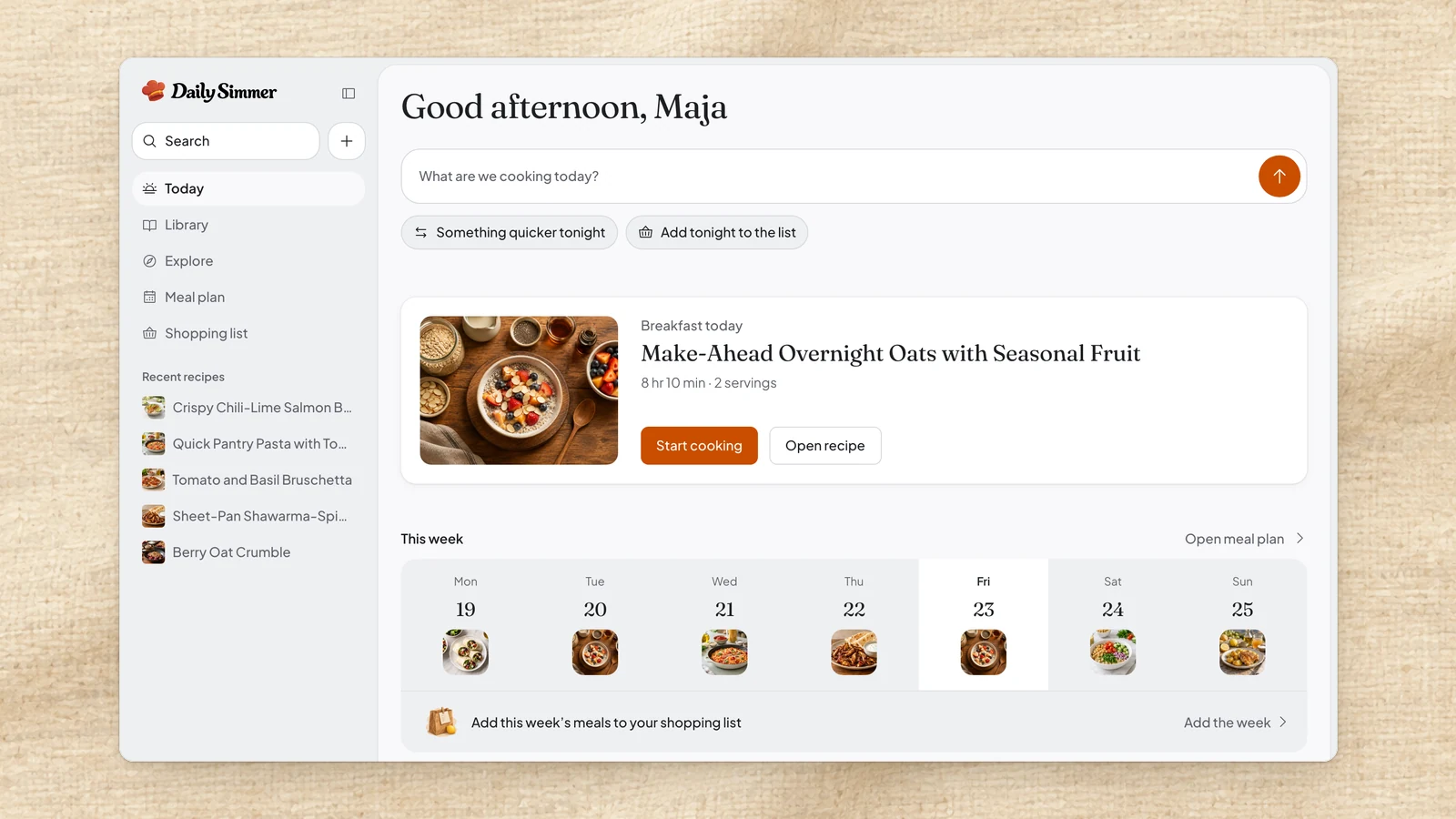
    The Today page in Daily Simmer, with a greeting, the field to say what to cook, today's planned breakfast with Start cooking, and the week's seven days below.

    A new Today

    The Today page now opens on what you're about to cook. Type a dish into its one field to create it, or paste a recipe link and the import starts straight away.

    Below that is whatever comes next: the dish on the stove, tonight's plan, or on a free evening, a few of your own recipes to plan for dinner in one press.

    Then your week at a glance, with its shopping list one press away.

    Your own star ratings

    Give any recipe your own star rating. Public recipes also show a "Community rating" from other cooks, and in a Family you'll see who gave what, so they'll see yours by name too.

    Sort or filter your library by stars to bring your favorites to the top.

    Explore by category

    Explore now opens on a row of illustrated categories, like breakfast or gluten-free, with recipes for the top ones below.

    Categories follow the time of day, and lean toward your diet and the appliances you own.

    Improvements6
    • Improved recipe pages, which now open on the photo, times and rating, with servings right above the ingredients.
    • You can now turn a post that lists ingredients and steps but no amounts into a recipe. Choose Create my recipe and we'll estimate the amounts and mark each guess.
    • Improved imports from short YouTube videos, which we now read when the description leaves out the amounts.
    • You can now name recipes from your library in a chat with Simmer by typing @ or pasting a recipe link.
    • Reopening Simmer now continues your conversation for eight hours, and each chat keeps its unsent text when you switch between them.
    • You can now choose one of eight themes in Appearance settings, such as Porcelain, Graphite and Blue Hour, each in light or dark.
  6. One shopping list

    Add a week from your meal plan or a recipe from its page to one shopping list, and search your own recipes and the community's from one place.

    Web

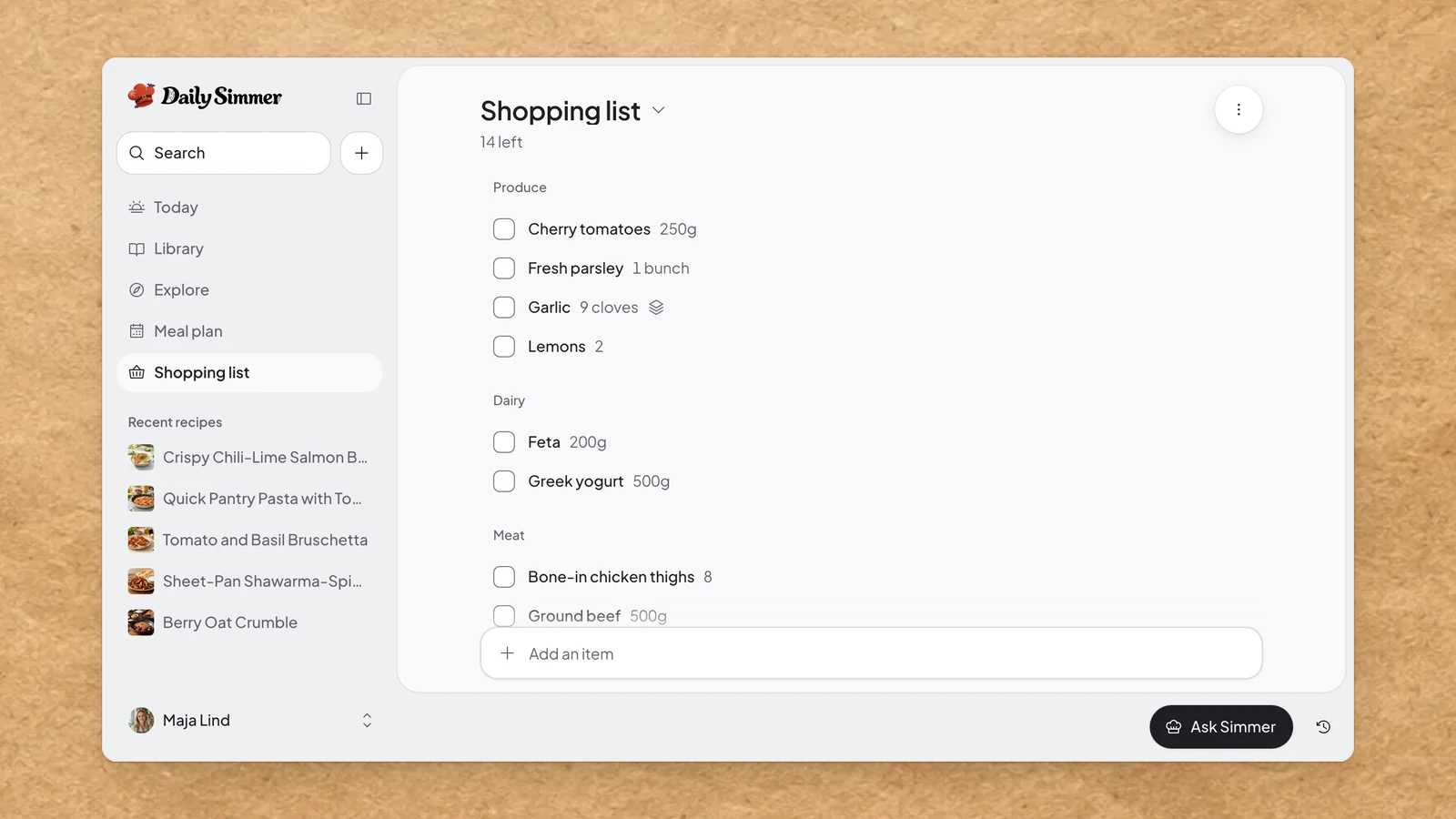
    A full week's shopping list in Daily Simmer with 14 items left, grouped into Produce, Dairy and Meat, and garlic from several recipes merged into one line.

    One shopping list

    Your shopping list is now one list. Add a week from your meal plan or a recipe straight from its page, and it all lands on the same list, with matching ingredients added together and every recipe they came from kept. Type anything else into Add an item and we'll file it into an aisle for you.

    In the shop, checking an item off moves it into "In your cart" at the bottom, so what's left to buy stays on top. The cart clears when you open the list for your next trip, with Undo if you still need something.

    Doubled-up items can merge into one row that keeps each recipe's share. A party or a big stock-up gets its own list, under the list's name.

    Search your kitchen and the community

    Press ⌘K or choose Search to look through your recipes and the community's at once, with yours showing up as you type.

    Found a community recipe you like? Save it to your library straight from the results.

    Improvements6
    • You can now choose Use this look again on a photo you made in Photo Studio to start a new one with the same framing, scene and atmosphere, or Use for another recipe to give another of your recipes that look.
    • Improved photo editing in Photo Studio, where Enhance fixes the light and framing of your own photo and keeps the dish recognizable.
    • You can now choose which of your recipes to share when you join a Family, and the rest stay Personal.
    • Saved recipes now follow their owner's sharing, so when an owner makes a recipe private, people who only saved it lose access.
    • Added Email settings, where you choose whether to get Getting-started emails and News & offers, both off until you turn them on.
    • Added a public Help center with guides, including how to send your shopping list to Home Assistant and other apps.
  7. Paste a link from a recipe site or a social video to get a clean recipe, bring your recipes over from Recipe Keeper, and let Photo Studio remember the look you like.

    Web

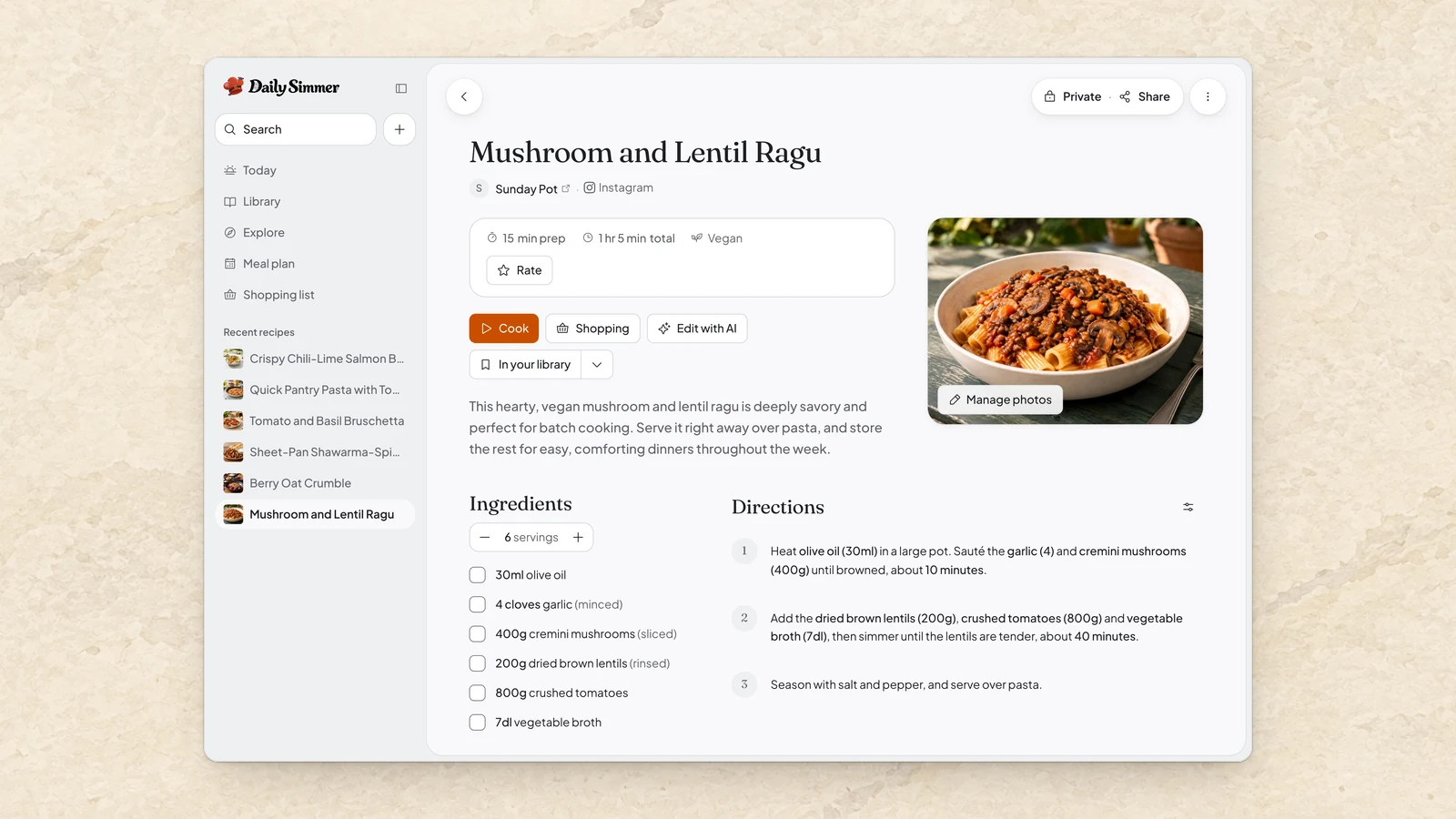
    A recipe imported from an Instagram post in Daily Simmer, Mushroom and Lentil Ragu credited to its poster, with its photo, six ingredients and three numbered steps.

    Paste a link, get a recipe

    Found something you want to cook? Paste its link and we'll turn it into a clean recipe in your library, with the ingredients, the steps, a photo and a link back to where it came from. That works for recipe sites and for posts and videos on Instagram, TikTok and Facebook. For YouTube, it works when the video's description has the recipe written out.

    When a link comes up empty, we'll tell you why and point you to what still works, like another link or writing it up yourself. A slow import keeps running in the background while you carry on, and the recipe is ready to open when it finishes.

    Bringing in a post or video counts toward your AI usage.

    Bring your recipes with you

    Moving from Recipe Keeper? Upload its export in Settings and your recipes arrive with their ingredient groups, notes, labels and photos.

    You can also export every recipe you own or can edit, with its photos and, if you like, your collections. A .simmer file restores into Daily Simmer whenever you need it, and a standard Schema.org copy is there for other recipe tools.

    Photo Studio remembers your look

    Photo Studio starts from a direction picked for your recipe, so you can make a photo straight away. Choose Change to preview other framing, scenes and atmospheres, and to set how far each new attempt can wander.

    Found a look you love? Choose Remember it and your next recipe photos start from it, still shaped to each dish.

    Improvements1
    • Improved allergen labels on recipes the assistant writes, which now catch more of the ingredients you can't eat.